

10.1″ Digital Calendar, Meal Planner, Duty Chart, to Do List,HD Smart Touch Screen Home Interactive Smart Electron Calender – Built-in Digital Photo Frame Function (white, 10.1)
$89.99
Related Products








Product description


Bullet Points: Compatible with many calendar apps Daily Life Planner 1920 x 1080 WXGA HD Display Resolution Built-in digital photo frame function
Mezed Digital Calendar
members informed by assigning colors and chores to them on the planner, so that your plans for each day are organized and run smoothly!
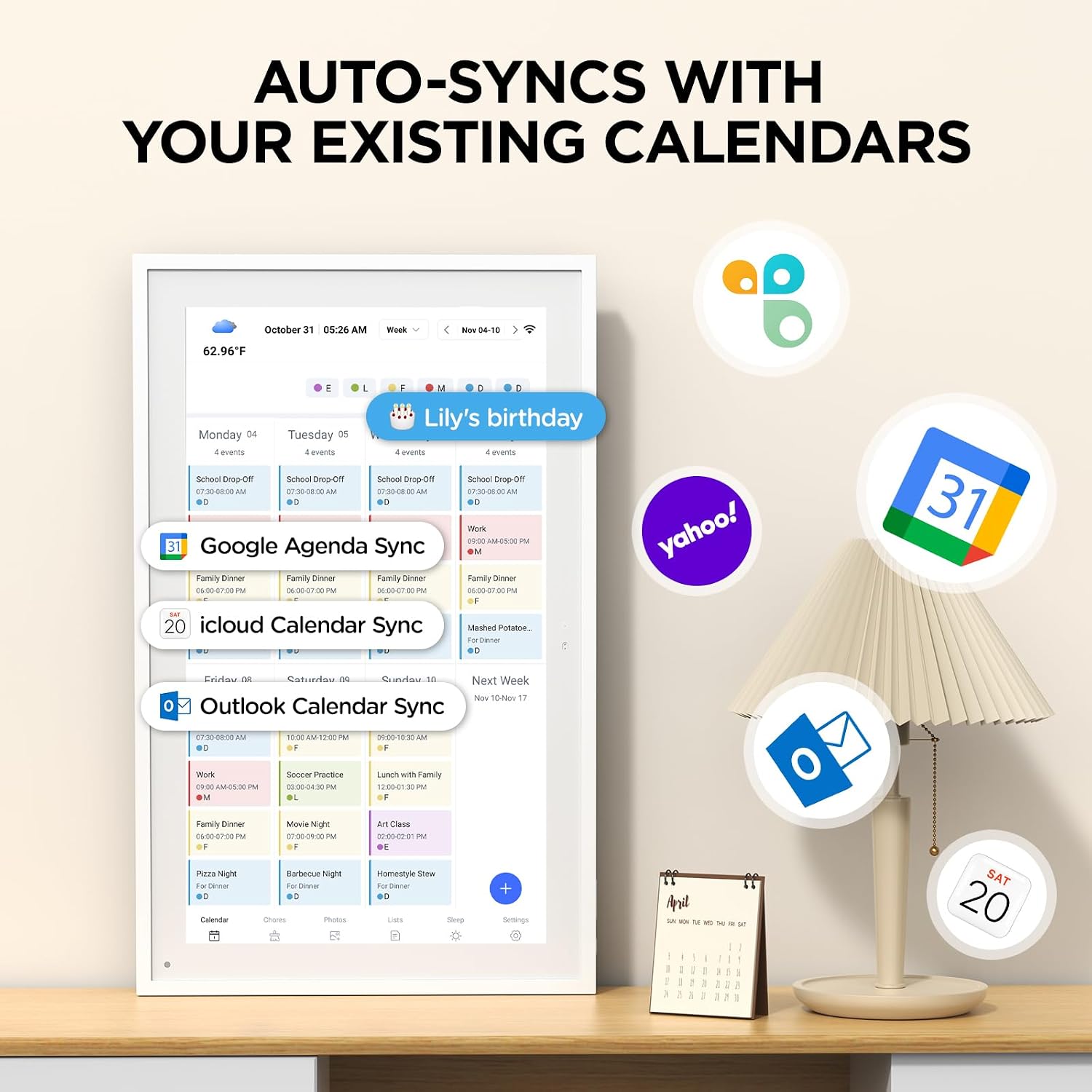
Compatible with Google Calendar, iCloud Calendar, Outlook Calendar, Cozi and Yahoo.

Meal Planner
The electronic calendar features a dedicated meal – planning section. Here, you can craft your daily breakfast, lunch, and dinner menus several days or even a full week ahead

Supports synchronization of multiple calendar apps
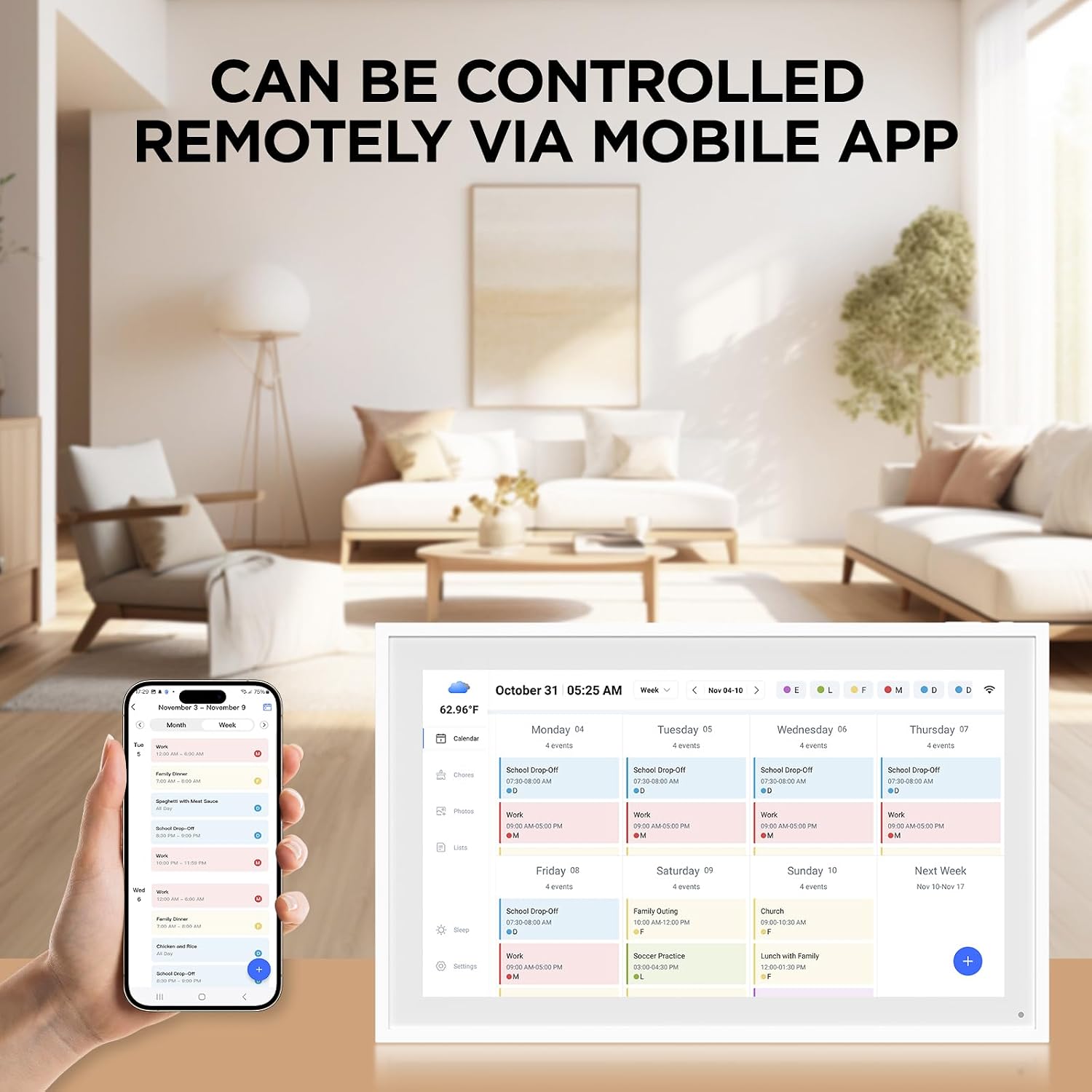
Mezed Digital Calendar is compatible with a variety of calendar apps, you can edit through the smart calendar can also be operated through the app calendar

Interactive Chore Chart & Rewards
Create, assign, and track chores with customizable rewards to motivate and celebrate your kids’ accomplishments.
📅 Smart Family Calendar – Mezed Digital Calendar (App/Touch Screen Dual Control) – Add family members, synchronize calendars, and assign tasks with just one click, making it easy for everyone to see at a glance
🖼️ Digital Calendar & Photo Frame 2-in-1 – Switch between a smart calendar and a digital photo frame with a tap. Sync photos, events, and memories via the app, and enjoy automatic updates across all devices—perfect for home and office use.
🍱Meal Planner – The electronic calendar features a dedicated meal – planning section. Here, you can craft your daily breakfast, lunch, and dinner menus several days or even a full week ahead. Additionally, it allows you to pre – arrange special menus for significant holidays or anniversaries. This way, you won’t need to devote a great deal of time each day to devising your family’s meal plan.
⏰ Smart Reminders & Weather Updates – Never miss an appointment with smart reminders and built-in weather forecasts (auto-location detection ). 🌙 Sleep Mode Included – Automatically dims at night for a soothing nighttime display, ideal for bedrooms or shared spaces. Perfect for home, office, or family use.
🔧 Reliable support and warranty – supported by 24-hour customer service and 2-year warranty, ensuring smooth installation and long-term satisfaction. Free online updates!
10 reviews for 10.1″ Digital Calendar, Meal Planner, Duty Chart, to Do List,HD Smart Touch Screen Home Interactive Smart Electron Calender – Built-in Digital Photo Frame Function (white, 10.1)
Add a review

$89.99
Laurel B. –
Get this over Skylight
Very easy to use, picture is clear and touchscreen is very responsive. The app and product are very easy to use, the calendar is very organized and keeps us going. The best part about this is the Picture Frame function, we love seeing the photos and videos of our family as it scrolls though them. A feature you have to pay a monthly subscription for on Skylight. All in all well worth the money, my wife loved it for Christmas
Kiran C. –
Calendar that makes planning simple
My daughter has been using this digital calendar, and it’s been really helpful for her. The screen is clear and easy to use, and she likes being able to see her schedule, to-do list, and duties all in one place. The photo frame feature is a nice bonus too. It’s made planning her day much simpler and less stressful.
Mara A. –
High-Quality Screen & Packed With Features!
This digital calendar is surprisingly impressive! The build quality feels premium, the frame looks clean and modern, and the screen is bright and crisp. The touchscreen responds quickly, and the interface is simple and intuitive.Even just exploring the features, you can tell how useful it will be. It has options for calendar views, to-do lists, meal planning, reminders, family member color-coding, and even a built-in digital photo frame mode, which looks beautiful. I also love that it syncs with your phone so everything stays updated effortlessly.Even before fully setting it up with my schedule, I’m already happy with the quality and design. If you want a smart, organized display for your home, this one is definitely worth it!
Amanda Casher –
Little Home Assistant!
Pretty cool! I was looking for something to spice up my home office. It’s not just a calendar, it’s also a digital photo frame, and it syncs with all my cloud calendars – sold!First off, the packaging was super nice. Even before I opened it, I was already excited to see what was inside. And when I did, wow, the screen is big and the display is super clear. It really looks sharp.Now, for a couple of minor things. It’s a bit heavier than I expected, and the bezel is actually thicker than my super-thin monitor, which was a bit of a surprise. Also, when you turn it on, the setup process is pretty smooth, though you do need to download their specific app to get everything configured.Here’s a small quirk: you can’t just tap the screen to wake it up. You have to press a button on the top, which means you typically need to place it somewhere that’s easy to reach the top. I did find a workaround though – you can actually orient the screen upside down, which puts the button at the bottom. The only downside there is the power cable then points upwards, which isn’t the prettiest look. But I do appreciate that it has a gravity sensor, so you can place it either horizontally or vertically, which is a nice touch! It would be awesome if it had a motion sensor to auto-wake when someone approaches, especially since it’s always plugged in, so battery saving isn’t really an issue.There’s also a Type-C port, but it doesn’t seem to be for charging. I’m honestly not sure what it’s for. For power, it uses its own 12V adapter.But let’s talk about the main event – its functions! Setting up the calendar is super easy and the display is really clear and straightforward. And here’s a neat trick: when you add an event to the calendar directly on the device, it actually syncs back to your cloud calendar too! Pretty cool, right?Overall, despite a few minor points, I’m really happy with this purchase. It’s a fun and functional addition to my home office, keeping me organized and displaying my favorite photos at the same time. Definitely a five-star gadget for me!
Sean Kane –
Very broad rights over your data & content
Ran the terms of use through ChatGPT and here is the output. I will be returning this, without using it.Below is a plain-English risk review, focusing on what could realistically affect you as a user.(References are to the uploaded User Service Agreement .)⸻1. Very broad rights over your data & content ⚠️Key issues• You grant Fujia a global, permanent, royalty-free right to use the information and data you provide.• All operational data (user relationships, usage data, etc.) belongs entirely to Fujia.• They have no obligation to retain or provide your data if your account is terminated.Why it matters• This goes beyond “using data to provide the service” and gives them long-term rights with little recourse.• If you upload anything sensitive, proprietary, or valuable, you should assume you lose control over it.Practical advice• Avoid uploading confidential, business-critical, or personal data you wouldn’t want reused.• Treat this as a low-trust storage environment.⸻2. Unilateral account termination (no notice, no appeal) ⚠️Key issues• Fujia can suspend or terminate your account at its sole discretion, without notice.• If they believe you are not the original registrant, they can immediately cancel your account.• After termination, they have no duty to keep or disclose your data.Why it matters• There is no meaningful appeal mechanism.• You could lose access and data instantly, even without malicious intent.Practical advice• Do not rely on this service as a single point of failure.• Keep independent backups of anything important.⸻3. No data backup, no liability for loss ❗Key issues• The agreement explicitly states that data backup is your responsibility.• They disclaim liability for data loss, corruption, leakage, or service interruptions.Why it matters• If something goes wrong (bug, account lock, server issue), you likely have no compensation and no recovery guarantee.Practical advice• If you continue using it, assume data loss is not hypothetical — it’s your risk.⸻4. Extremely broad liability disclaimers ⚠️Key issues• Fujia disclaims responsibility for:• Service outages• Errors or defects• Security breaches• Indirect or consequential damages• Even if they were warned of potential harm, liability is largely excluded.Why it matters• If the service causes financial, reputational, or operational damage, your legal remedies are minimal.Practical advice• Fine for casual or low-impact use.• Risky for anything business-critical or regulated.⸻5. Chinese law + PRC jurisdiction 🇨🇳Key issues• The agreement is governed by mainland China law.• Disputes are resolved under PRC legal standards.Why it matters• If you’re outside China, enforcing rights or challenging actions would be costly and impractical.• User protections may differ significantly from US/EU standards.Practical advice• Treat enforcement risk as effectively one-sided.⸻6. WeChat-based login & identity linkage 🔐Key issues• Registration is tied to WeChat login.• Account recovery does not guarantee verification of the real owner.Why it matters• Loss of WeChat access could mean permanent loss of your account.• Weak recovery standards increase takeover risk.⸻Bottom line (TL;DR)Low concern if:• You’re using this casually• You don’t store sensitive data• You can afford to lose access or dataHigher concern if:• You plan to use it for business or automation• You upload valuable or proprietary information• You expect strong legal protections or data ownership
evamaria712 –
Wir haben den Bilderrahmen für die Oma gekauft damit sie jederzeit Bilder der Kinder bekommen kann. Durch eine APP können auch mehrere Berechtigte auf den Rahmen zugreifen. Ein bisschen unglücklich finde ich die Formation manchmal wenn man das ganze Bild auf den Rahmen bringen möchte. Ist der Besitzer des Rahmens einigermaßen fit im Umgang ist es aber ganz unkompliziert wenn man mal einen „Kopf“ nach unten ziehen muss. Ansonsten kann man die Fotos aber auch als nicht Vollbild schicken (das muss am Gerät aber vorher eingestellt werden, also entweder Vollbild Modus oder nicht)Trotzdem würden wir ihn wieder kaufen und sind auch ganz begeistert wie toll und einfach das funktioniert. Deshalb auch eindeutig 5 Sterne.
jedirockets –
1_Banalità: non c’è un telecomando…Quindi se voglio cambiare qualche cosa devo alzarmi e andare a toccare lo schermo2_ è arrivata senza la classica pellicola protettiva sullo schermo LCD!!!!! Imbarazzante3_ Non mi legge la sd…..ora la Sto arrivando! formattando nuovamente…non vorrei fosse un problemaMolto positivo è la semplicità delle impostazioni.
francis –
impossible à connecter , clé wifi limitée en caractères ,et connexion au serveur jamais effectuée , produit défectueux renvoyé
Saskia –
Ich bin total begeistert! Ich kann hier keine langweilt Erfahrung mit dem Gerät wieder geben, aber der erste Eindruck ist für den Preis sensationell. Es macht einen hochwertigen Eindruck, funktioniert so wie man sich das vorstellt, super einfaches Bilder hochladen über die App!
Claudia –
Ich muss sagen, dieser Bilderrahmen ist wirklich klasse. Das anpassen der Fotos geht sehr einfach. Die Wiedergabe ist auch perfekt und das Bilder laden über die App geht auch sehr gut. Das Preis Leistungsverhältnis stimmt auch. Es stimmt einfach alles. Kann ich absolut empfehlen