

Thermalright Frozen Notte 360 White ARGB V2 Water Cooling CPU Cooler, 360 Specification CPU Liquid Cooler,3 PWM Fans, for AM4/AM5,Intel lga1700/1851/115x/2011
$53.59
Related Products



Product description


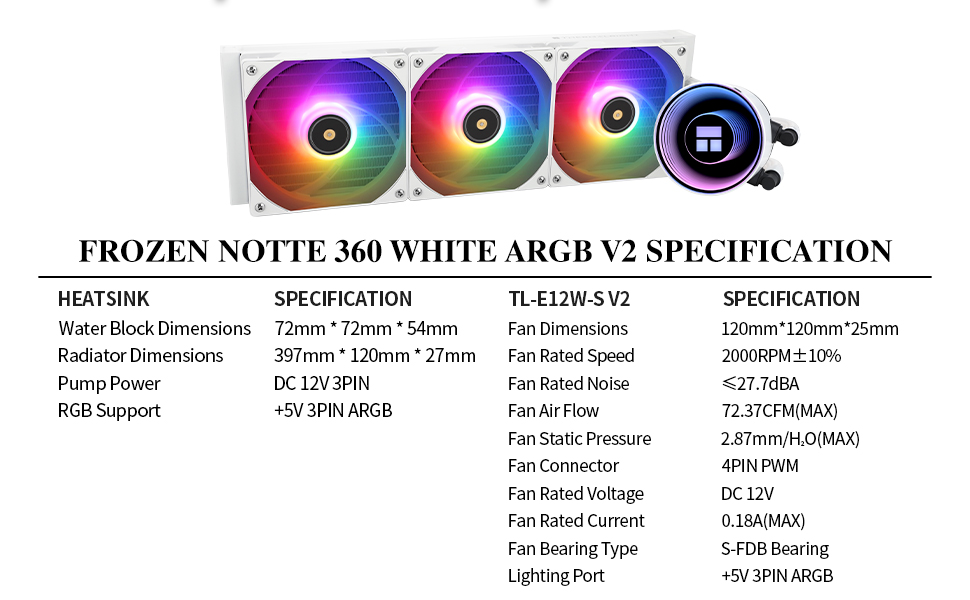
【Better Cooling】Water block with full copper mirror plane base + 360 specification white aluminum fin cold plate + high polymer woven protective water pipe + standard 120mm argb fan to create low resistance, high cooling, low evaporative, long-life integrated water-cooled cooler.
【 Heat Sink Parameters 】 The size of the CPU water-cooled heat sink is 397 * 120 * 27mm, the length of the water conduit is 450mm, and the water pump speed is 5300RPM ± 10%. Under the synchronous operation of the three cpu fans and the cooling head, the heat sink can effectively cool the CPU temperature.
【High-performance Cold Head】 Using high-quality copper bottom with 0.1mm spacing, plus aluminum alloy cover and high-strength acrylic top cover, using mirror plating and reflection process to create an exclusive pump head, and the speed is up to 5300RPM±10 %, which ensures long-term, excellent cooling of the CPU.
【3 PWM Fans】TL-E12W-S V2 balanced fan×3, the speed can reach 2000RPM±10%, the size is 120*120*25mm, the noise is≤27.7DBA, the interface: 4pin PWM, the wind pressure: 2.87mmH2O(MAX), Air volume: 72.37CFM (MAX), S-FDB bearing can solve the problem of cpu fan chattering in hoisting mode, with PWM and ARGB functions, can automatically adjust the speed according to the CPU temperature, can provide strong airflow and lower noise, ARGB Light color can be adjusted manually.
【Compatibility Extensive】Support Intel: LGA 1150/1151/1155/1156/1200/1700/1851/2011/2066; AMD: AM4/AM5/AM2/AM2+/AM3/AM3+/FM1/FM2/FM2+, with dual platform full Metal black buckle, easy to install, can be well installed on the corresponding CPU platform, the chassis width is recommended to be greater than 250mm.
13 reviews for Thermalright Frozen Notte 360 White ARGB V2 Water Cooling CPU Cooler, 360 Specification CPU Liquid Cooler,3 PWM Fans, for AM4/AM5,Intel lga1700/1851/115x/2011
Add a review

$53.59
Dugger –
Great AIO at any price!
Excellent AIO at any price, but insanely cheap! in fact, the price was so low that I initially diregarded it, but then caught a Youtube review that sung it’s praises, so I took the chance, and I’m glad I did. It installed super-easy into my AMD Ryzen 7800X3D build, looks great, and keeps my temps at 42-45 degrees at idle. Love the infinity mirror over the cooler. Have had my rig up and running for over 2 months now with no issues and everything running super-cool.
Photographer –
Great performance @ incredibly low price
I have come to really trust Thermalright brand. This is my third Thermalright product and all of them have performed really well, and the prices are substantially lower than comparable competitions.This AIO was packaged well in a fairly large box. Everything was well organized, and installation was fairly straightforward. Construction of the unit itself is top notch. While someone may not like the appearance of the pump on the hosts, I actually really like the fact that the pump is not on top of the CPU; the hosts can dampen any vibration coming from the pump. A minor issue is the fact that the cables for the fans are all loose and not bundle together. But they can all be hidden below the MB and out of sight.If you have a hot running CPU like 13th or 14th generation i7 (I have i7 13700K), this AIO can really tame the temperature. Idle temperature is mid 20’s C while upper 50’s to lower 60’s under load (Topaz AI, LrC, and Photoshop). Temperature can spike to mid 80’s for a second or so and then drop down to 70’s when cooling catches up. I am sure some tuning of the fan and CPU parameters can further minimize the spike, but it does not bother me at all.This AIO has eliminated my concern regarding potential thermal damage of the CPU. There is always the potential of leakage especially down the road, but I cannot comment on that at this point.
Big T –
If your budget is tight, it is an easy buy.
It is five stars because of the price. It is an affordable, simple AIO with a tiny bit of flash on the fan and heat sink. Is it great RGB? Nah. Is the infinity mirror that cool in person? Meh. It’s nice. Like, there isn’t anything wrong with it. If it were someone you took on a date you would say they had a nice personality. However, if this thing were a coworker, you’d say they were rock solid and dependable and did not do anything annoying in your office.If this is what your budget allows, go right ahead and buy it without worrying. This company put the money into making it work well, not looking particularly pretty.
Glal –
One of the best AIOs, especially considering the price
I have been using and testing this AIO since I received it shortly after Black Friday. Please note that my computer sits on a separate platform next to my computer, so it’s about 2.5 feet away from my ears, and it’s contained in a Corsair 5000x RGB. Intel 12700k CPU, Asus TG H670 Pro Wifi D4 mobo.I ran this in all 3 positions (top, side, front), with tubes up and down (front & side).Even during Cinebench, LinPack Extreme, Time Spy and Prime 95, the temperatures ranged no higher than 89C with ambient (room) temperature around 23C. It was always quiet although, after the few 3 months, I noticed an occasional harmonic resonance tone, which I assume was from the fans, and I little bit of noise from the pump. The best position for both the CPU and GPU in my case was on the side, exhausting the air, with the tubes going from the side of the block to the top of the radiator. Indeed, it was also one of the best positions overall, as it also did a good job keeping both the VRM heatsinks and motherboard cooler than 6 of the 10 positions I have tested so far.This is the first AIO I have tested, and you can watch my initial video about it on YT on my channel, The PC Expert Amateur. There will be at least one follow-up video with technical results once I complete the other 10 tests I need to do.Please note that WelshyTech (YouTube) deemed this and the Frozen Magic Scenic V2 to be loud, but he has his computer on his desk less than a foot from his head. He also noted that the MS V2 is slightly more powerful than the Notte.The mounting system is a bit awkward. At one point, I had to reorient the block and was unable to see (that’s the bad thing about putting it on the floor) that I had missed putting two of the mounting screws through the bottom holes for the block, which resulted in bending them and slightly damaging the blue plastic stand-offs. Also, the knurled nuts are easy to turn by hand, and also have a large Philips cross for a screwdriver, but it is very easy to have them drop down to the bottom of the case. Aside from that, it’s not bad, especially considering that you can mount the block in any orientation (I suggest top or right side). If you have a LONG graphics card and want to mount it on the front or side, you will likely have to vertically mount the GC (and if the case design is poor, as the 5000x’s is, you will struggle to find a mount that won’t choke the fans because it’s too close to the left side panel) in order to do so. If you want to do a front mount with the tubes going to the bottom of the radiator (i.e. the radiator is positioned so that the tube apertures are at the bottom, not the top), it will probably be a tight fit, especially if you have a very long case, you may not be able to do it without modifying the tubes, so make sure that the block is mounted with the tubes on the side. Before finalizing the mounting of the block and rad, make sure to verify it will fit without putting too much pressure on the fittings on the block and rad. The block does have swiveling fittings for the tubes, so that does help, but it can still be a bit difficult.
C. Jackson –
Terrible rgb but quiet and cool
Plan on getting better fans if you want argb. These are crap and each of them mirror each other so it’s one signal copied across all three, I’d be surprised if they had 8 lights each.Idle and high cpu stress doesn’t seem to bother it much, great pump and radiator so far. Great as a cooler, bad at being flashy and cool. Fit is great in most popular cases that can accommodate 360mm row, radiator is thinner than I expected and efficient. Paint quality is good too. Price is just right. But the fans won’t impress anyone. Great for blackout or dark builds where it doesn’t matter.
oscar ortiz –
Great value
Does a great job and I remember it being easy to install (also comes with thermal paste applied making it even easier)
J. E. Grimes, Jr. –
Thermalright Frozen Notte 360 Black ARGB V2 Water Cooling CPU Cooler, 360 Black CPU Coole
Great item. Fairly easy to install. It’s keeping my cpu at idle temps 38-40C /102-105 F. On my online games my temp goes to about 109F. The fans do come pre-installed which makes it easier. It’s black but does have argb lites on the cooler and the fans. Noise level a little loud when my cpu heats up, but not terrible.
Nereida Ramos –
Works well great price
One year in and never had an issue. Kept my i9 13900k cool no issues.
dj123789 –
Max temps hit 72°c at maximum on full utilization on the i5 13600K. around 39°c on idlethe pump&fans are littlebit on the louder side… though you can’t complain for the price.
Jaber07 –
المنتج جميل وانصح بشرائه كان عندي مبرد هوائي توصل درجة الحرارة فيه الى 85٪ الان بهذا المبرد المائي الحرارة ما توصل 65٪
Faris Abu Zaitoun –
I bought for my son pc, cpu was reaching mid 70s. After installation won’t go over mid 40s. For the price and quality i can’t complain.
Annuar –
I have been using it for a year now with no issues. I use it to cool a 14700k and it performs great.
Hafeez B Kamarudin –
Pair this with I9 13900KS. So far keeping my CPU temperature ar 42 and gaming at 65. Only thing is the fan is a bit loud but that’s because I haven’t setup the fan settings in the bios. Installation also is fairly easy.