

Meshnology ESP32 Lo Ra V3 Development Board + 1100mAh Battery + Case + USB Charger Cable Set – with 915MHz Antenna and SX1262 Lo Ra V3 Devices for Mesh Tastic Ar duino Lo Rawan IOT (N30,4-in-1,Black)
$35.99
Related Products
![Type C Charger Fast Charging for iPhone 17 16 15, 2Pack [10FT&6FT] Long USB C Cable with 25W Phone Super Fast Charger Block Compatible with Galaxy S25/S24/Plus/Ultra,iPhone 15/16/17/Air/Plus/Pro Max](https://futureflowtech.co/wp-content/uploads/2025/11/61ds9lV9RaL._AC_SL1500_.jpg)




From the brand

Meshnology
Welcome to Meshnology. The future is open, and it’s yours to build.
ESP32 LoRa Set -1100mah (N30 )
ESP32 LoRa Set -3000mah (N35 )
Wio Tracker L1 Board N37 Set
ESP32 LoRa Set -3000mah (N35 )
ESP32 LoRa Case (N35 )
ESP32 LoRa Board Series
Battery with JST1.25 connector
Battery with PH2.0 connector
3.7v battery for wio tracker
LoRa Antenna 915MHz 10dBi Gain
LoRa Antenna 915MHz 10dBi Gain
Advanced Dual-Core Performance: Unlock the full potential of your IoT projects with our 2-piece set featuring the ESP32 Lo Ra development board, powered by a robust dual-core ESP32-S3FN8 processor. With a clock speed of up to 240 MHz and a five-stage pipeline architecture, this board delivers high performance for complex applications and devices.
Exceptional Connectivity: Experience seamless connectivity with integrated WiFi, Lo Ra, and Blue tooth capabilities. Our development board comes equipped with a dedicated 2.4GHz metal spring antenna for Wi-Fi and Blue tooth, along with an U.FL interface specifically reserved for Lo Ra use, ensuring stable and long-range wireless communication.
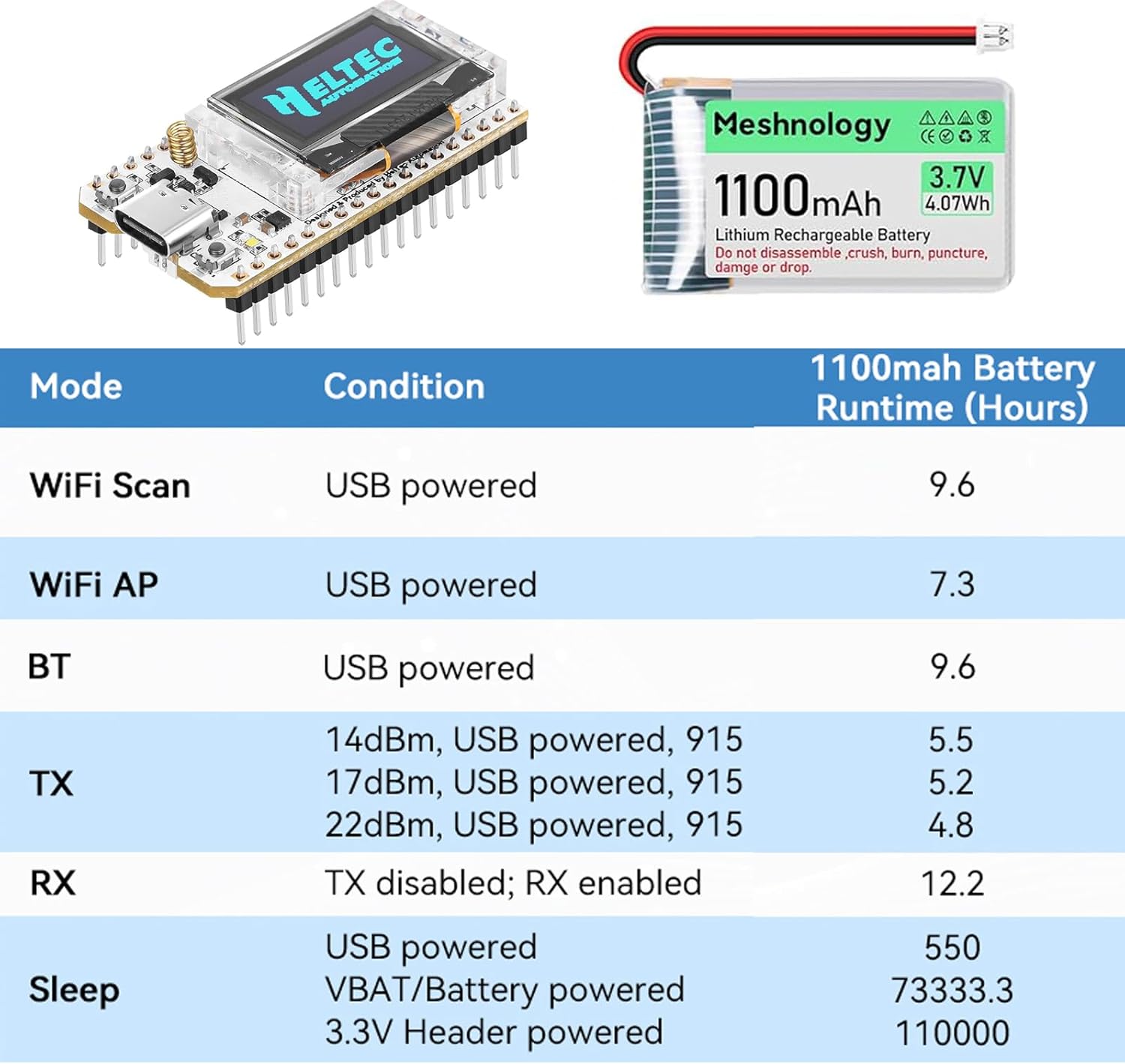
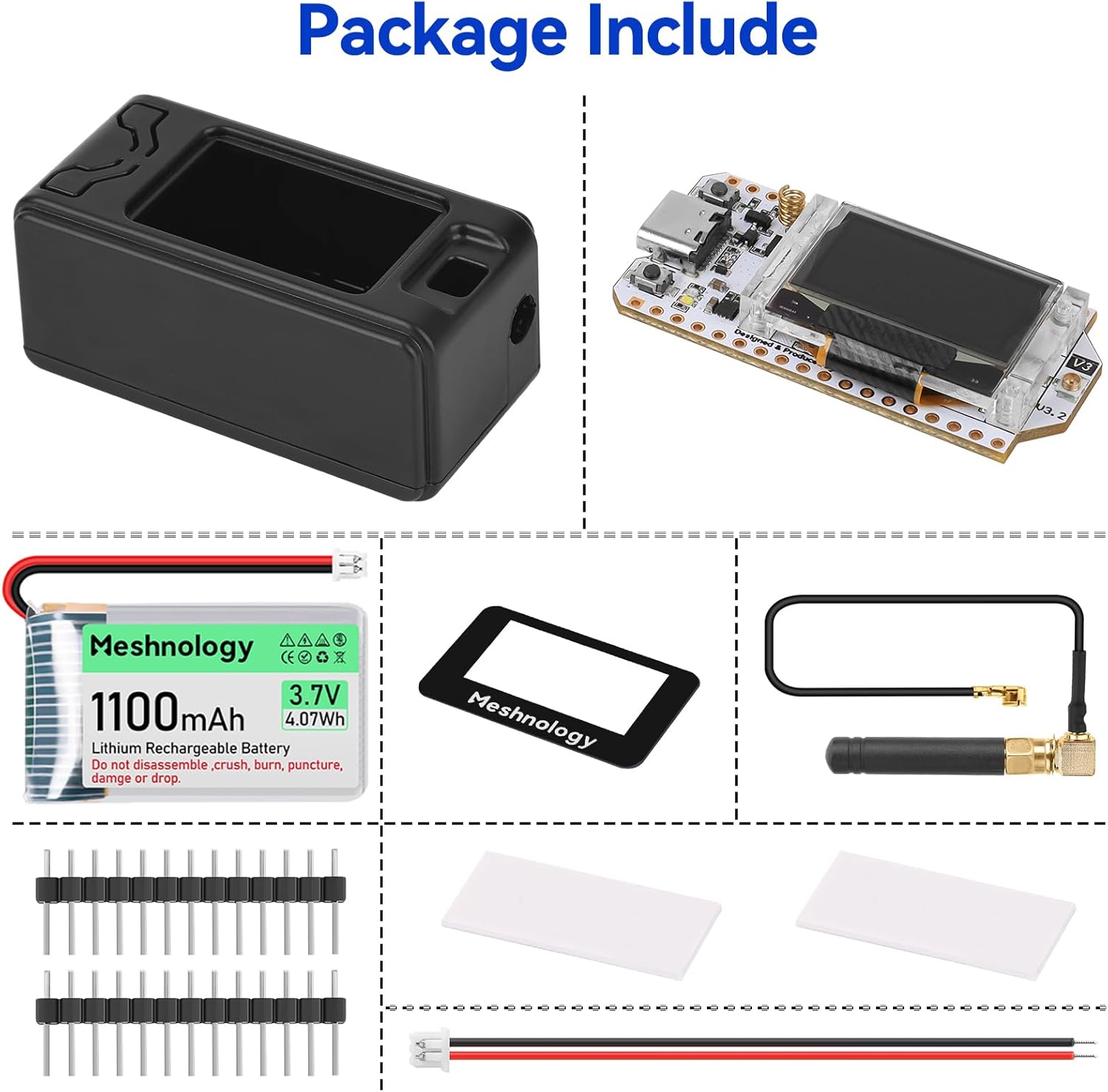
Powerful Battery Management: This development board includes an 1100mAh battery and an onboard SH1.25-2 battery connector, this unit comes with a USB charging cable for effortless charging. Benefit from intelligent charge and discharge management, overcharge protection, battery level detection, and automatic switching between USB and battery power for uninterrupted operation.
Enhanced User Interface: With a 0.96-inch 128×64 dot matrix OLED display, our development board is perfect for showcasing debugging information and battery status. The Type-C USB interface ensures complete voltage regulation, ESD protection, short circuit protection, and RF shielding, enhancing safety and reliability for all your projects.
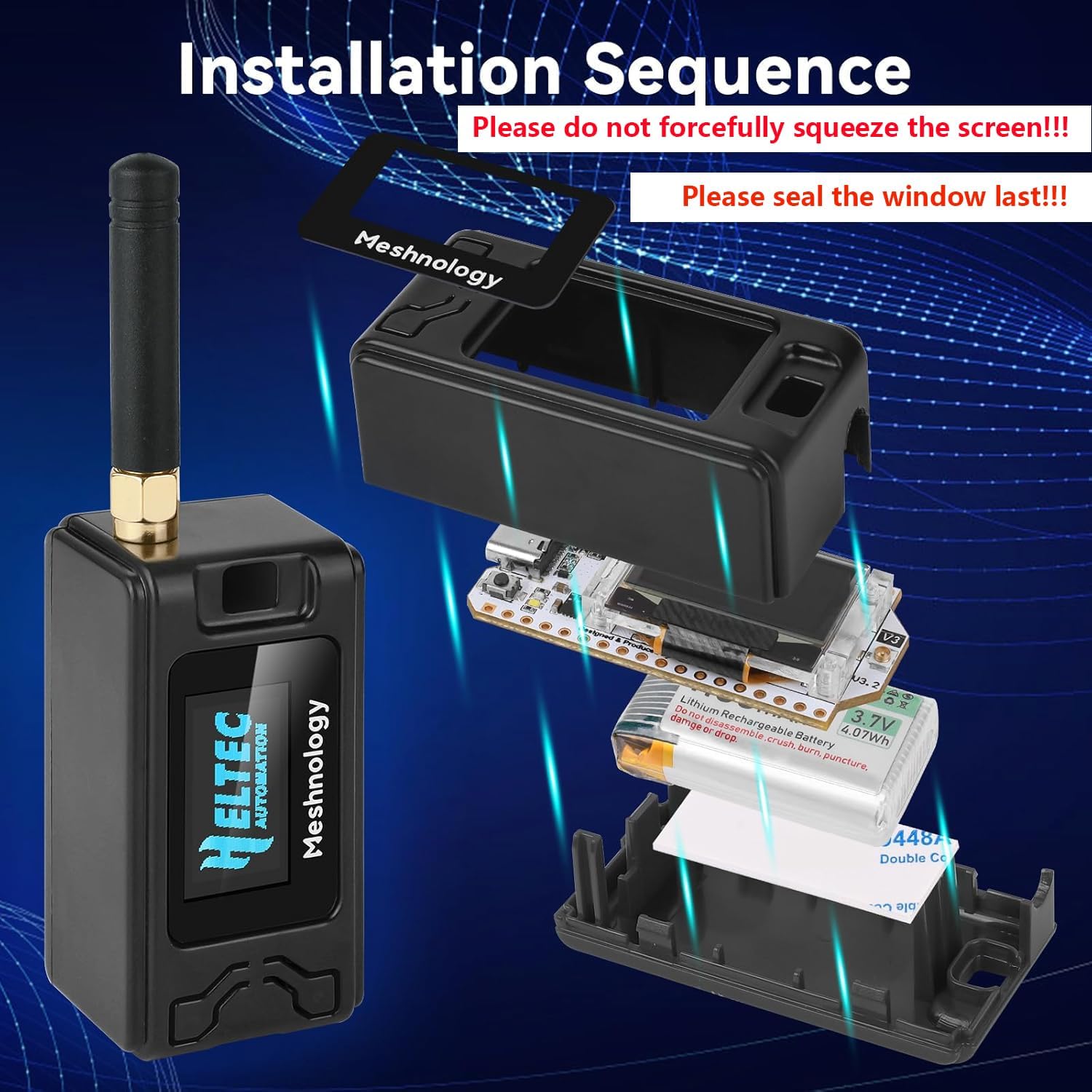
Developer-Friendly Design: Created with developers in mind, this board supports the Ar duino development environment and includes an integrated CP2102 USB-to-serial chip for effortless programming and debugging. Coupled with excellent RF circuit design and low power consumption, it stands out as a perfect choice for scalable IoT solutions. Plus, our specially designed Meshtastic Lo Ra V3 case ensures compatibility and protection for your ESP32 Lo Ra V3 board, antenna, and 1100mAh battery (or batterie size smaller than 952540mm), making it an essential companion for your electronic endeavors.
For after-sales issues, please email us. Please refer to our brand customer service~
9 reviews for Meshnology ESP32 Lo Ra V3 Development Board + 1100mAh Battery + Case + USB Charger Cable Set – with 915MHz Antenna and SX1262 Lo Ra V3 Devices for Mesh Tastic Ar duino Lo Rawan IOT (N30,4-in-1,Black)
Add a review

$35.99
Chris M –
A perfect entry into LoRa nodes
While sitting in the dark during the most recent power outage, straining to keep a single bar on my cell phone due to the extended outage having drained the cell towers’ batteries it dawned on me that it’s time to set up a mesh network for my neighborhood. This is a low cost but effective entry point into the world of Meshtastic and LoRa networks. What makes LoRa unique is the ability to send and receive text over the mesh network without a cell signal. It’s long range line-of-site communication can enable you to text with your family or friends even miles away if there are enough nodes in place.The Meshnology ESP32 kit itself is sturdy enough, definitely gives science fair vibes rather than finished off-the-shelf consumer product, but that comes with the territory for this open-source development board. Installing the firmware was the biggest challenge, you have to enable the correct ports on your computer first, then ensure you’re connecting with a USB-C Data cable not just a cheap power cable. One successful, you’ll need to enable the Meshtastic app on your phone to allow Bluetooth to connect to the device. After all that, you’ll see the node and any others in your area. If you’re the first node around, it’s going to be lonely for awhile,, but fortunately these are cheap enough to buy a few. Combine them with an external solar battery pack and a waterproof enclosure, and you’ve got an easy, free emergency texting solution for your community for less than $100 with no contracts, no corporations, and no subscription fees, just a few transceivers and a learning curve. Plus, it’s immensely satisfying and fun to send messages knowing you’re not enriching a phone company.
Andy H –
Good introduction to meshtastic but this is a bit of a battery hog.
A good starter to Lorawan and meshtastic. Almost everything you need to get started – and then you’ll want more.These were my first foray into Meshtastic and set up was pretty easy. I wasn’t sure how much pressure was needed for the antenna pigtail but keep pressing hard until you hit it click into place.The cases are a little finicky to snap together and I’ve had them come apart a couple of times, especially when they’ve been dropped but the pieces inside have stayed resilient and working.As they’re ESP32 based, they are fairly battery hungry getting about 6 hours from 95% of usage.I have had some stability issues when running with the network mode enabled and the device just stops responding and pretty sure it reboots as the uptime drops. Using the networking so I can interrogate the battery status through Home Assistant to turn the charger on and off with a separate charger.The device is in the 2nd floor room by a window and my nearest nodes are 2km away all ? hops away. The signal states it is bad.Next node is 12k away at 1 hop away but being close to a main city, I can hop to nodes 37km away at 6 hopsI’ve had to reprogram the name of the device multiple times as I find it keeps reverting back to the meshastic name (which might be why I see so many other devices with the generic meshtastic names too)
Terry Richardson –
Easy assembly and great idea
Reading the instructions, it is an easy assembly and works as it should upon completion. Be SURE and do not power up without antenna connected or you could burn out the transmitter.
Chris G –
Not a great starter
Absolutely horrible! Doesn’t show up on meshtastic, wont connect to computer, zero instructions on use, and no port recognition out the gate. Now does this mean that this thing will never work? No. But, is this a “great” starter kit? Not at all. get something with instructions. Watch some youtube videos first. Honestly maybe even buy just a board and then make your own case for it once you know it is working. The boards can be bought way cheaper and you will deal with the same amount of problems. Not worth the money. Ability to learn to trouble shoot and problem solve a product should not be a litmus test for if you are allowed to have or use it and it is for sure not a good starter kit if you have to scour the internet just to learn to set the thing up.
Elm0 –
Casing heeft intern een te lang pootje wat op de batterij connector komt waardoor deze niet sluit. Moest een stuk afknippen om dicht te krijgen.Apparaat zelf werk prima met MeschCore. Batterij gaat een 8 a 10 uur mee.Bereik kleine antenne vanuit huiskamer naar 1e repeater ongeveer 1km
Frans Dijkstra –
Prima set met goede accus
Ade –
Easy build node. The antenna is very small and therefore for short distance use only. Flashed fine with Meshtastic firmware and paired with my phone. Have connected it to a larger antenna for a better signal.
Nicholas –
Per il prezzo non è male. Ho però qualche appunto:il primo “problema” è che non è ben chiaro come aprire questo case una volta chiuso. Funziona ad incastro, ma non c’è un modo semplice per aprirlo. Infilando un piccolo cacciavite a testa piatta tra le fessure si può forzare l’apertura senza romperlo, però mi sembra comunque molto scomodo.Il secondo “problema” è che il case è un po’ piccolo, e può contenere solo batterie da 1000mah o meno. Il che lo rende un po’ poco performante. Per usarlo con la mia, ho dovuto fare un buco a lato e attaccarla esternamente col bio adesivo.Detto questo, buon rapporto qualità prezzo.
Kurtis –
IMPORTANT TO KNOW…These Heltec V3’s work great and are currently operating as they should. However, there are a few things you should know. When you first try to flash them with meshtastic, they need to be in “boot mode”. Hold the power button while plugging into the usb on your pc. If they don’t show up in the devices you will need to download a driver from the web (search for it) and manually load the driver the way you would any hardware. Second, they do not work well when they are on and within BLE (bluetooth) range of each other. They will act buggy, constantly reboot and will be hard to stay connected in the app. Use one at a time when they are within 100′ of each other. Third, they will also act buggy when they are in a heavy wifi signal or bluetooth environment. They do not handle high traffic bluetooth and wifi devices. Keep this in mind before you get too frustrated, they should work good otherwise.