

Logitech MX Master 2S Bluetooth Edition Wireless Mouse, Multi-Surface, Hyper-Fast Scrolling, Ergonomic, Rechargeable, Connects Up to 3 Mac/PC Computers – Graphite
$64.99
Related Products





Move content between 3 computers. Download Logitech Flow and move text, images and files seamlessly between devices. Darkfield™ High Precision tracking. Enjoy flawless control on virtually any surface, even glass. (4mm min. thickness) Fast recharge. Power up for a full day of usage in just 3 minutes. Holds power up to 70 days on a full charge. Hyper-fast scrolling. Speed adaptive scroll wheel switches from click-to-click to ultra-fast scrolling. Experience side-to-side scrolling with a simple thumb stroke. Comfortable shape. Carefully crafted to support hand and wrist in a comfortable natural.
Connect up to 3 Computers: Logitech Flow allows you to seamlessly control up to three computers with one wireless mouse, and copy-paste text, images and files between them (1)
Precise Control: This multi surface mouse uses Darkfield High Precision tracking to give you flawless control virtually anywhere – even on glass (2) with up to 4,000 DPI
Quickly Charges: Connect the Bluetooth mouse to your computer and get enough power for a full day of use in only 3 minutes; a full charge lasts up to 70 days (3)
Speed-Adaptive, Side-to-Side Scrolling: Scroll through web pages faster and easier with the speed-adaptive scroll wheel and side-to-side scrolling with a stroke of your thumb (4)
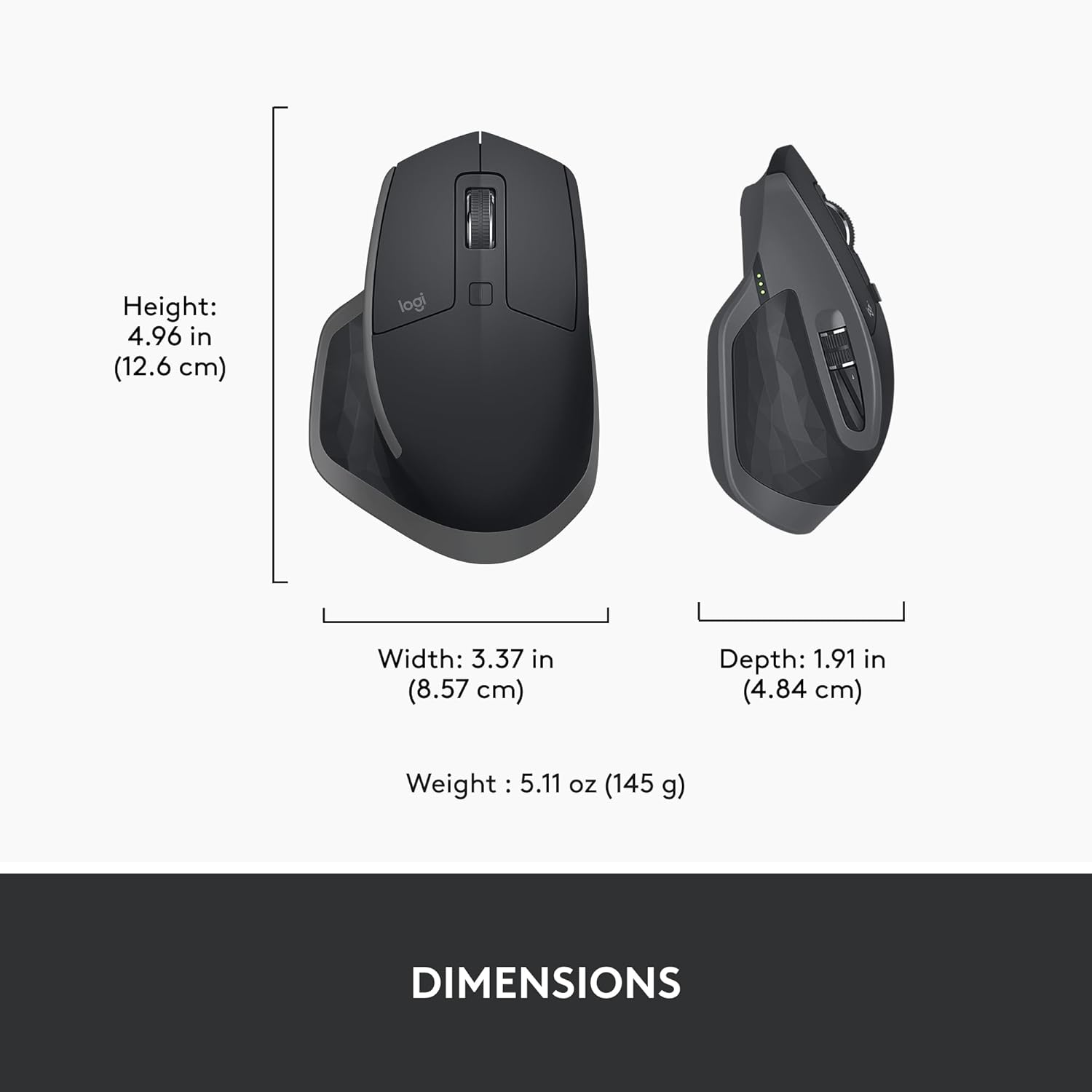
Finely Designed: An ergonomic wireless mouse with a hand-sculpted shape (5) that supports your hand and wrist, plus fine-motion control and well-positioned buttons and wheels
11 reviews for Logitech MX Master 2S Bluetooth Edition Wireless Mouse, Multi-Surface, Hyper-Fast Scrolling, Ergonomic, Rechargeable, Connects Up to 3 Mac/PC Computers – Graphite
Add a review

$64.99
C.Benjamin –
Consistent Logitech quality. Excellent feel (ergonomics) and performance.
This is my third Logitech mouse in the MX Master series that I bought in recent times. After being totally impressed with my own MX Master 3S, I bought an additional MX Master 3S for my son (a graphic artist), and most recently, this MX Master 2S for my daughter (everyday computer usage). We are all super happy with these mice.Dependable Logitech quality, 2 months+ of usage on a single charge, useful features that are easy to access and activate, customizable button functions based on the specific software that you are using, and ergonomics that absolutely first rate. Even the mouse feel is solid. It does not feel flimsy or fragile, and the main mouse buttons (left and right click) feel the exact same way today as they did almost 2 years ago when my MX Master 3S was new. The variable speed scroll wheel is also so genius and convenient, adapting the scroll speed based on use without needing to selective press a button to change the scrool speed. (There is a button to change the scroll speed, but I almost never use that button since the mouse itself will automatically change the scroll speed mode based on how I use the mouse.)I know that there are other brands and designs out there, but based on cheaply some of them feel in hand, and how over time the main mouse buttons begin to lose their spring support, I am happy to spend the little extra to purchase a Logitech mouse that I know I will be happy with for the long haul.
Michael Dixon –
AMAZING!
This product is amazing. It is worth the money. I would 100% recommend this product. Unfortunately I lost the one I bought, but since it is so good I will be buying a replacement. The battery lasts very long, the wireless is super easy to connect, it’s not very loud, it moves very smoothly, and the scrolling speed is amazing, because it is so smooth and fast. Even though it is fast it’s very easy to control. This is an amazing mouse!
David ski –
AWAKEN!!!!! Good mouse, frustrating Bluetooth flaw.
I am a big fan of logitec products they do a wonderful job. This mouse feels great, has a wonderful array of buttons and functions. The mouse connects to Bluetooth easily. But the reason its 3/5 stars is when the mouse in not in use it takes a good 3-5 seconds to awaken. This wouldn’t be an issue if the mouse went to sleep every 15 minutes. The experience I have is the mouse goes to sleep every 2-3 minutes sometimes seems faster. It is very frustrating to try and type up a document and every time you stop to make a grammar or spelling correction the mouse doesn’t respond for the next several seconds. I have to assume this has to do with Bluetooth connectivity, I’ve searched for settings and changed many to keep the connection active but I’ve had no success. If this mouse had a wireless usb receiver like most I would exclusively use it. I like the mouse but would not buy it again, for this price I can get something else that is comfortable and does not have this sleep lag issue. (UPDATE) originally rated 3/5. You can purchase a USB receiver and pair the device to it solving the issue. Great mouse.
Phillip Green –
Home run. Great product.
10 out of 10 would recommend. If you want a smooth comfortable mouse with mappable buttons, this is your mouse. I’m a CADD coordinator for a large engineering firm and this is what I suggest to all of my drafters. Even now as some of us have moved to 3D, I still use this with my space mouse when working in Inventor. With this model you still get the “click” sound when operating it. For me, I like that. The software makes it so easy to map the buttons to suit your workflow and needs. For me it’s ergonomic and reduces pressure on my wrist. My favorite feature, next to the easy of operation, is the thumb rest with a button straight down. For AutoCAD “enter” is a key used hundreds a time a day. My thumb button is mapped to “enter”. The look is professional too. It feels balanced. Not too heavy and not so light as to feel cheap
Thaher –
Great product for long hour work, Highly recommend
This is a great mouse. I specifically like the scrolling with the wheel. It has a lot of functions and buttons. I like the side wheel as well because it helps quite a lot while you are reading a pdf by zooming in. You can adjust the functions of these keys as well using Logitech software, which is another cool feature, I guess. The click sound is quite fine with me. The battery life of this mouse is really great. I am a heavy user of computers due to my work, but the mouse charge stays pretty well for a couple of days. As I have a big hand, this thing suits me pretty well. The size is good enough to fit my hand comfortably. So, the grip is good as well. You can connect the Bluetooth pretty easily if you are tech-savvy. For not tech savy people, it might be a little problematic. You can increase the speed of the mouse by changing the dpi level. Also, you can use the gesture feature to do a lot of things. So, I think this is a great mouse for long time owrk and accuracy. The only thing is that they can make things easier for not tech savy people. It is a great thing to have for people who work long hours ona computer.
Cristhian Heredia –
Great product
Great product, it works perfectly and offer a lot of options to interact with.I would prefer the apple magic mouse scroll but i know is a native thing.
William Mitchell –
By far one of the best mouses I’ve ever used, but I knew this as I had an MX Master 2S mouse before. The battery died after six years and while I could just replace the battery, it was old and dirty so I just replaced it.The “Bluetooth edition” perfectly syncs up with the unified receiver with zero issues, (but you can definitely use Bluetooth if you’d prefer) although I did have to install the Options+ software from Logitech.I like the “clickiness” of the buttons on this mouse. The MX Master 3S has softer clicks which I personally don’t like. The free scroll wheel is of course the absolute best feature here.The back/forward buttons on the thumb are placed absolutely perfectly, and that little scroll wheel is super handy for wide documents or spreadsheets.All said: definitely a good, solid mouse. I like the ergonomics and love that it works with the unified receiver.
Katerina Martini –
I love this mouse! My hand sits comfortably on it, and I adore how smoothly it moves. The material is nice and I like how I can scroll sideways, which is especially helpful while working with large excel files. The clicking is crisp and not too loud. I like that I can connect to multiple devices which makes it convenient to bring to work and switch to my personal laptop at home. The only thing I would point out is that it was a little trickier to connect to my macbook, and that there are options to connect to three devices, which might be inconvenient if you use more than that.All in all, I’m glad I spent a little more money on this mouse.
J. Lap –
The standout feature of this mouse is its ability to connect to up to three different devices via Bluetooth. You can easily switch between devices using the channel selector — it works smoothly and reliably, and that’s definitely the mouse’s strongest point.In terms of ergonomics, however, it’s not the most comfortable I’ve used. While the grip is decent, I started to feel some hand and wrist fatigue after moderate use. The click buttons are just okay — nothing special — and the scroll wheel is where things get more frustrating.The wheel offers two scrolling modes: smooth and notched. But neither feels particularly satisfying or precise when scrolling through long pages or documents. It lacks that responsive, premium feel you’d expect from a higher-end mouse.Overall, this is a solid choice if your top priority is multi-device Bluetooth functionality. But if you’re looking for top-tier ergonomics or click performance, there are better options out there.
Troy Fleury –
Replacement mouse for the same model. Arrived on time and functions as expected. Battery doesn’t last as long as manufacturers rating due to its age. The battery can be replaced with a little effort if needed. I find it more comfortable and functional than the newer versions (mx m 3).
Lavagau –
Très bon produit, peut être connecté sur trois ordinateurs sans antenne