
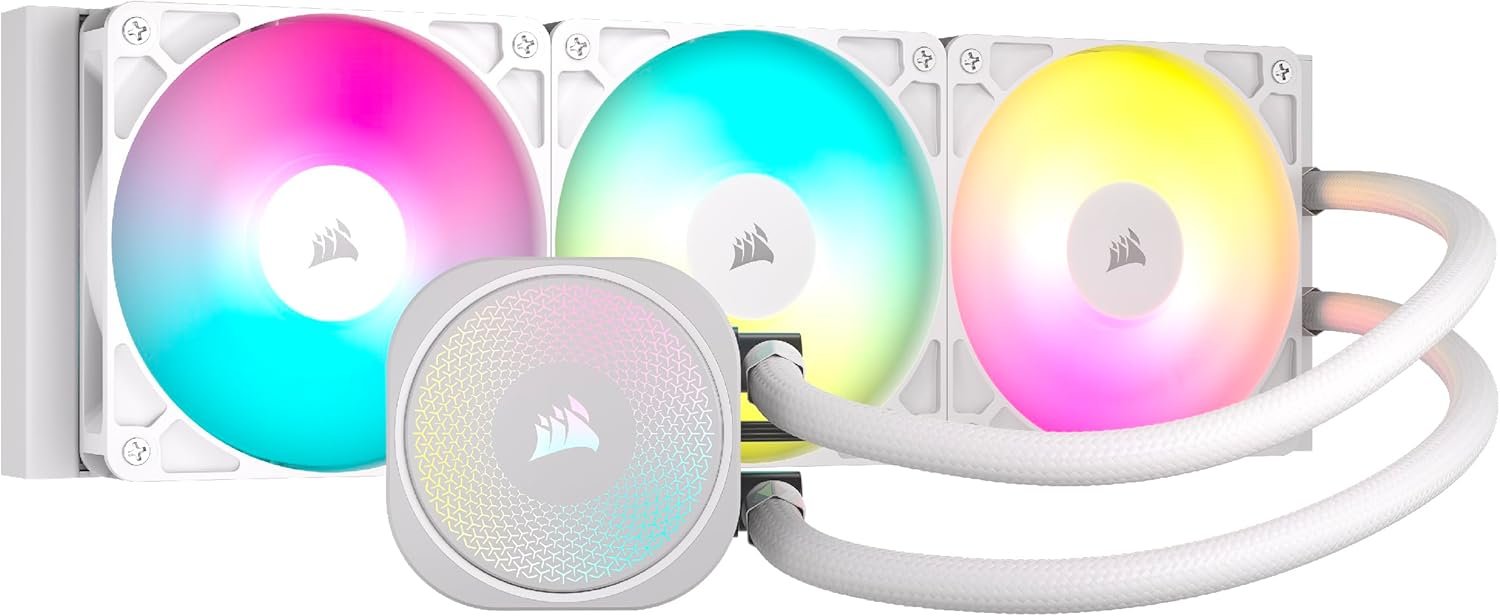
CORSAIR Nautilus 360 RS ARGB Liquid CPU Cooler – 360mm AIO – Low-Noise – Direct Motherboard Connection – Daisy-Chain – Intel LGA 1851/1700, AMD AM5/AM4 – 3X RS120 ARGB Fans Included – White
$21.99
Related Products


The CORSAIR NAUTILUS RS ARGB Liquid CPU Cooler showcases CORSAIR’s excellence in engineering and design, offering efficient, low-noise cooling with straightforward connectivity – no controller required, just plug directly into your motherboard. Its slightly convex cold plate with pre-applied thermal paste ensures superior thermal transfer, while RS120 ARGB fans maintain low temperatures for maximum CPU performance. Eight RGB LEDs on the pump head and each fan light up your system with easy motherboard control. Simplify your build with easy, daisy-chained connections and precise cooling control via a 4-pin PWM fan header. For more advanced control, an optional iCUE controller (sold separately) can be used. Supporting a wide range of Intel® and AMD® CPU sockets, including LGA 1851, the NAUTILUS RS offers broad system compatibility.
Simple, High-Performance All-in-One CPU Cooling: Renowned CORSAIR engineering delivers strong, low-noise cooling that helps your CPU reach its full potential
Efficient, Low-Noise Pump: Keeps your coolant circulating at a high flow rate while generating a whisper-quiet 20 dBA
Convex Cold Plate with Pre-Applied Thermal Paste: The slightly convex shape ensures maximum contact with your CPU’s integrated heat spreader, with thermal paste applied in an optimised pattern to speed up installation
RS120 ARGB Fans: RS ARGB fans create strong airflow and high static pressure, with easy ARGB control via a compatible motherboard. CORSAIR AirGuide technology and Magnetic Dome bearings ensure great cooling performance and low noise
Easy Daisy-Chained Connections: Reduce the wiring in your system by daisy-chaining your RS ARGB fans and connecting them to just one 4-pin PWM fan header and one +5V ARGB header
Compatible with Intel LGA 1851, LGA 1700, and AMD AM5, AM4.
11 reviews for CORSAIR Nautilus 360 RS ARGB Liquid CPU Cooler – 360mm AIO – Low-Noise – Direct Motherboard Connection – Daisy-Chain – Intel LGA 1851/1700, AMD AM5/AM4 – 3X RS120 ARGB Fans Included – White
Add a review

$21.99
Your Average Shopper –
Cool and Quiet
There’s a lot to love about this cooler—honestly, it’s hard to know where to begin.I’m using it to cool an Intel i9-14900K paired with a modern GeForce RTX GPU, so this rig sees its fair share of gaming and heavy workloads. And this cooler handles it like a champ.🛠️ Build Quality & InstallationThe craftsmanship is top-tier. Everything you need is in the box—mounting hardware, wire extensions, even washers for a secure fit on the mounting rail. It’s clear the design team thought through the entire installation process. The radiator is solid, and the fans mount cleanly with a daisy-chain setup that keeps cable clutter to a minimum. Even the connectors are a cut above—especially the 3-pin plugs, which snap in snugly and stay put, unlike the flimsy ones you get from some other brands.🌡️ Thermal PerformanceThis cooler delivers. With just a browser open, I’m idling around 30°C. Under stress tests and benchmarks, I barely saw temps break 79°C. The fans ramped up, but even then, they stayed impressively quiet. It’s the kind of performance that makes you do a double take—cool and quiet rarely go hand in hand, but here they do.🔄 Reliability & Upgrade ExperienceI picked this up to replace a cooler from a different brand that failed after just a year. That one was supposedly decent—same manufacturer as my motherboard—but it never performed like this. Even at its best, it idled at 30°C in the dead of winter. By the time I swapped it out, it was sitting at 59°C doing nothing. This new cooler? Night and day difference.⚙️ Final ThoughtsI’m not overclocking—though I easily could. I just like knowing my CPU is running cool and stable. And with this cooler, I’ve got peace of mind and performance to match.
Keely VanZant –
Good value for the money and works flawlessly.
– Quick and painless install came with all hardware to mount to my ASUS motherboard.- Looks really good, the RGB effects are nice.- Kept my Ryzen 7 9800x3d CPU below 70C playing arc raiders under max settings for a couple of hours- For 100 bucks it’s good value if you don’t care about having the digital display
Jacob Henry –
Fantastic AIO, strongly recommend!
Great AIO, it works, its cheap for corsair, fits well, looks fantastic. Absolutely no complaints, it cools my 7800X3D with ease.
UrAverageShopper –
works as intended
Has been working great so far. Installation was straightforward, and the direct motherboard connection made cable management simple. The daisy-chain setup for the fans is convenient and keeps the build clean. Overall, it’s a capable cooler that works as intended.
Gracie’s Dad –
Annoying, but Effective
I’m not a gamer, but I run my PCs 24/7/365. When it was time to retire my current box, I went through the usual process of selecting the next batch of components. My preferences in a CPU cooler are simple — big radiator, no lights, and no software. My last box ran flawlessly for years using a Corsair cooler, so this seems like a no-brainer.And mostly, it was. This has to be one of the more annoyingly packaged components I’ve ever purchased. The hardware and fans come in these little paper envelopes; I get the environmental consciousness, but could I please have a reusable bag, because I’m not using all the hardware and would like to keep the stuff I don’t use? Also, give me a one page quick start guide. I’ve done this before and I don’t need a 50-page manual. But I don’t want to scan a QR code on the side of the box and read stuff on my phone just to make sure there’s nothing new since the last time I installed one of these things.Speaking of installation, I put my cooler in a Lian Li Lancool 216 case, which I cannot recommend highly enough. The case has multiple options for liquid cooling, depending on the size of the radiator. I mounted mine in the top, opting to keep the front- and rear-mounted 160mm fans for additional airflow. The radiator fit easily, although I did have to put the hoses toward the front of the case in order to fit the radiator over the edge of the rear case fan. The radiator fits easily and the provided hardware, once it’s out of the stupid little bags, is good quality. The backing plate is nicely machined and fit perfectly on my MSI motherboard. The pump attaches securely with four threaded standoffs and spring-loaded thumbscrews.Remember I mentioned the directions that you’re pointed to with the QR code? I think they messed up in one area. The fans are daisy-chained together so that they only use one PWM connection. Corsair suggests that you mount the fans to the radiator before mounting the radiator. For me, it was easier to mount the radiator and then lay out how I wanted to install the fans. This way I could make sure that I had the fans in the best orientation to keep the fan wiring short and out of the way.Overall. I think this is another solid product from Corsair. For the new box I went with thermal efficiency over raw power and selected a Core Ultra 7 CPU. I could probably run it on air cooling if I had to, unlike the previous i7 which gets quite a bit hotter. With the Corsair cooler, CPU temps should stay pretty low; I haven’t exercised the box too much yet (still moving apps and whatnot) but so far CPU temps have been quite low. And it’s been pretty quiet as well. Other than the packaging and installation annoyances, it’s been good.
Hisoka –
Excellent Cooling Performance for the i9 14900k
I originally had a Coolmaster single fan cooler on my new i9 14900k. While playing Arc Raiders the temperature would peak at around 85 degrees Celsius. After upgrading to this AIO, I now average about 60 degrees Celsius during gameplay. When idling or watching Netflix the temperature used to be around 45 and now it stays at about 32. This AIO is a beast and it keeps everything running super cool.The only downside is the instructions are not helpful at all. I had to watch two YouTube videos. One video helped me figure out the wiring and the other showed where everything plugs into the motherboard. Once you understand the cables, just connect everything and plug into CPU Fan, AIO Pump, and the 5v header labeled ADD_GEN2_1.Overall a great product that delivers amazing cooling once you get it set up correctly.
Dhanreeve Cunanan –
I love it good performance
ありす –
ちょーいいかんじかわいい
Kai –
The Corsair NAUTILUS 360 RS ARGB Liquid CPU Cooler is a brilliant choice for high-end systems. I’m using it with an Intel i9 and it keeps temperatures very low, even under heavy loads. The 360mm radiator provides excellent heat dissipation, and the three RS120 ARGB fans are quiet while still moving plenty of air.Installation was straightforward, and the direct motherboard connection with daisy-chain cables makes the setup neat and easy to manage. The lighting looks amazing through the glass side panel, and the build quality feels very solid.Noise levels are minimal, even when the fans ramp up, which makes it perfect for anyone wanting both performance and silence.Overall, a top-tier cooler that performs just as well as it looks. Great airflow, quiet operation, and a sleek design that fits perfectly in a premium build.
Sven –
Die Corsair H100x RGB Elite ist eine leistungsstarke und optisch beeindruckende All-in-One-Wasserkühlungslösung, die speziell für Gamer und PC-Enthusiasten konzipiert wurde. Diese Einheit vereint effiziente Kühlleistung mit eindrucksvollen RGB-Beleuchtungsoptionen.Design und Aufbau:Die H100x RGB Elite zeichnet sich durch ihr modernes und elegantes Design aus. Die Kühlkörper und Lüfter sind in mattem Schwarz gehalten, was ihnen ein hochwertiges Aussehen verleiht. Die RGB-Beleuchtung, die sowohl am Pumpengehäuse als auch an den Lüftern angebracht ist, bietet eine breite Palette von Farben und Beleuchtungseffekten, die über die Corsair iCUE-Software individuell angepasst werden können.Kühlleistung:Dank eines 240-mm-Radiators und zweier leistungsstarker 120-mm-Lüfter bietet die H100x RGB Elite eine hervorragende Kühlleistung. Die Lüfter können große Luftmengen bewegen, während der Radiator die Wärme effizient ableitet. Selbst bei intensiven Anwendungen bleibt die CPU kühl, was die Leistung und Stabilität des Systems sicherstellt.Installation:Die Installation der H100x RGB Elite ist benutzerfreundlich und unkompliziert. Corsair liefert alle notwendigen Halterungen und detaillierte Anleitungen, um den Einbau schnell und einfach zu gestalten. Die flexiblen Schläuche bieten genügend Spielraum, um die Kühlkörper an verschiedenen Positionen im Gehäuse zu montieren.Geräuschpegel:Die H100x RGB Elite überzeugt durch eine geringe Geräuschentwicklung. Die Lüfter arbeiten selbst unter hoher Last leise, und die Pumpe verursacht keine störenden Vibrationen oder Geräusche. Dies macht die Kühlereinheit ideal für Nutzer, die eine ruhige PC-Umgebung bevorzugen.Software:Die Corsair iCUE-Software ermöglicht eine umfassende Steuerung der RGB-Beleuchtung und der Lüftergeschwindigkeit. Die Benutzeroberfläche ist intuitiv und benutzerfreundlich, sodass auch Einsteiger problemlos Anpassungen vornehmen können. Mit der Software lassen sich individuelle Profile erstellen und die Beleuchtung mit anderen Corsair-RGB-Produkten synchronisieren.Fazit:Die Corsair H100x RGB Elite ist eine erstklassige Wasserkühlungslösung, die sowohl durch ihre Kühlleistung als auch durch ihr Design überzeugt. Die einfache Installation, die leise Betriebsweise und die umfangreichen Anpassungsmöglichkeiten der RGB-Beleuchtung machen sie zu einer hervorragenden Wahl für Gamer und PC-Enthusiasten.
José Otávio –
Caixa veio em perfeito estado