
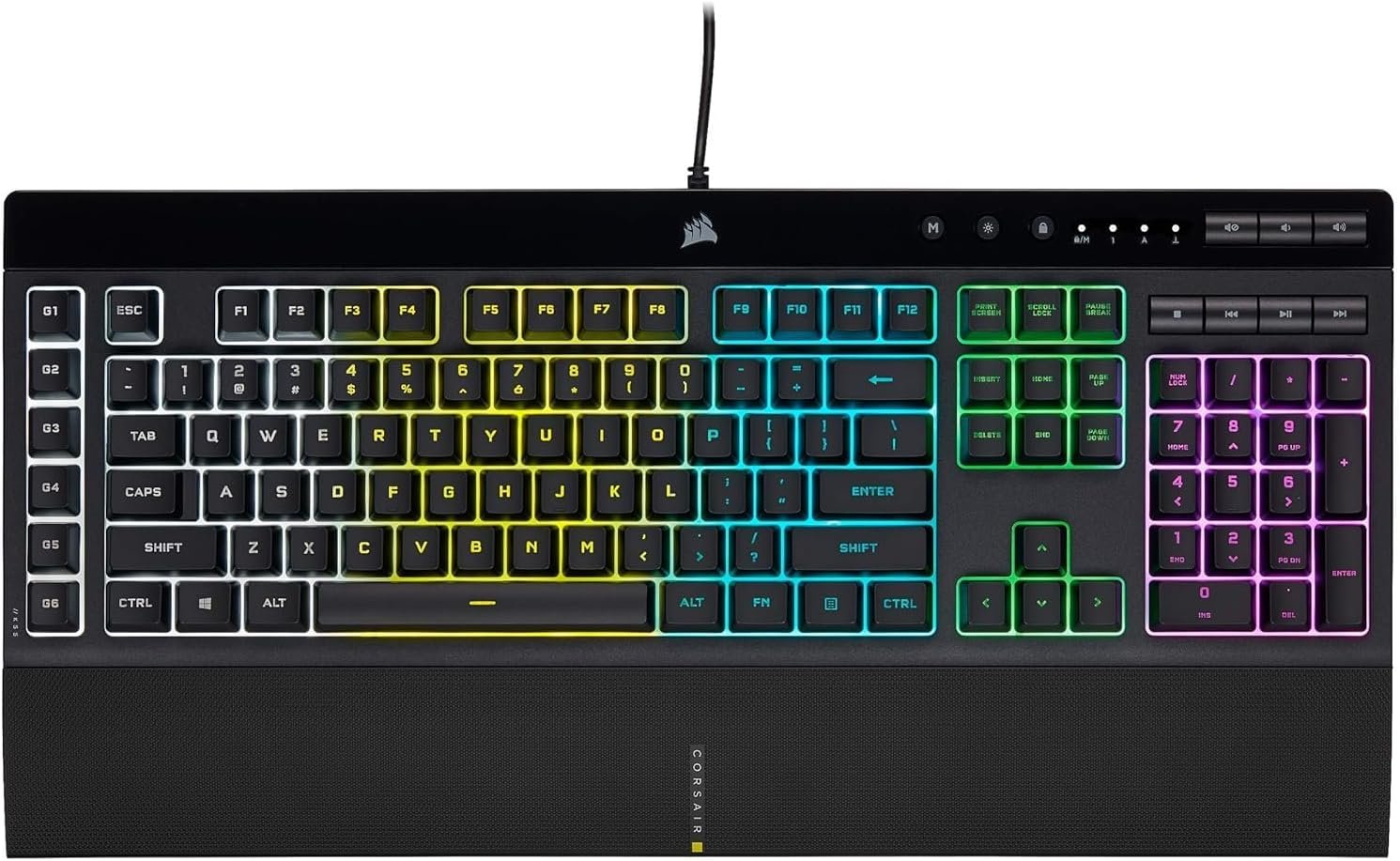
Corsair K55 RGB PRO Membrane Wired Gaming Keyboard – IP42 Dust and Spill-Resistant – 6 Macro Keys with Elgato Integration – iCUE Compatible – QWERTY NA – PC, Mac, Xbox – Black
$44.99
Related Products


The CORSAIR K55 RGB PRO Gaming Keyboard lights up your desktop with vibrant five-zone dynamic RGB backlighting and powers up your gameplay with six easy to set up dedicated macro keys. The K55 RGB PRO is certified for IP42 dust and spill-resistance to stand up to wear, tear, and more, with a detachable palm rest to ensure all-day comfort. Quiet and responsive keys are comfortable for typing or gaming, and dedicated media keys put play, pause, and more within easy reach. CORSAIR iCUE software makes it easy to personalize your lighting and macros, while anti-ghosting and selective key rollover ensure your critical inputs are delivered when they matter most.
Dynamic RGB Backlighting: Light up your desktop with six onboard lighting effects, assign a color to each lighting zone, or program your own vibrant lighting effects across five RGB lighting zones with CORSAIR iCUE software.
Six Dedicated Macro Keys: Activate functions, shortcuts, or keypresses in just one stroke with six dedicated macro keys, easily set up through CORSAIR iCUE software, or use instant streaming commands through Elgato Stream Deck software.
Dust and Spill-Resistant Design: IP42-rated protection guards against accidents so your gameplay never has to stop.
Detachable Palm Rest: A soft rubber palm rest reduces stress on your hands so you can play longer in comfort, with a textured surface to keep your hands from slipping.
Dedicated Volume and Media Keys: Convenient control for media playback and fine-tuning volume on-the-fly without having to interrupt your game.
9 reviews for Corsair K55 RGB PRO Membrane Wired Gaming Keyboard – IP42 Dust and Spill-Resistant – 6 Macro Keys with Elgato Integration – iCUE Compatible – QWERTY NA – PC, Mac, Xbox – Black
Add a review

$44.99
Steven –
Must buy
It’s amazing, love the sound and the way it feels when you push the buttons and the weight it’s two pounds so yeah and the typing is silent and the quality it’s just another level with the RGB lights making it amazing and you can lower the lights and the keyboard works amazing due to its weigh
Art the Science Guy –
4 ILLUMINATED KEYBOARDS RATED – This one is the best of the the four!
My favorite, most used keyboard in my office is my Das 4 Professional Soft Tactile MX Brown Mechanical Keyboard. I mention this so that you could have an idea as to what I look for in a keyboard. Although Das does make an illuminated keyboard, Das Keyboard Prime 13 White LED Backlit, at $129.00 it’s a bit too steep for most of us. I wanted an illuminated keyboard for home use so I could use it at night without disturbing anyone by having to keep the overhead lights on.I ended up buying 4 keyboards looking for the one that not only had good backlighting but also good typing action making it easy to see at night and easy to type on. I wanted to keep the price to around $50.00 – so here is what I bought in order:Perixx PX-1100 ($59.99)The keyboard has serious flaws that significantly interfere with it’s stated purpose. It is supposed to be illuminated so that it could be used in a dark room. It specifically states that it has key and letter illumination which it does but here lies the problem – the illumination is very uneven with some keys being very bright and others just an inch or two away being very dim. As an example, the left arrow key on my keyboard was very bright while the right arrow key was barely visible especially since the keys next to it were so bright! Another factor is the brightness surrounding the keys which in some areas is brighter than the keys themselves which makes it more difficult to read them. This keyboard apparently has “zone illumination” meaning that it has just a few LED’s lighting up the keys and in some places, near the edge of the zones, there are dim areas – very dim areas, even with the brightness at maximum. If you’re buying this for the illumination to make it easier to read in a dark room, look elsewhere. If you want a cool looking, colorful keyboard that has relatively good good typing action this is your keyboard, it is heavy, well built, has good typing action and poor lighting. This was the first one I bought and I was very disappointed with it, hence the mediocre rating.Azio – Vision Large Font Keyboard ($29.99)This keyboard has large font: letters, numbers and symbols making it very easy to read in a darkened room. The lighting is even throughout the entire keyboard, there are no bright or dark areas and you can easily change the color of the keys for the entire keyboard or within the 5 lighting zones. For people with vision impairments, this is your keyboard. It is easy to use, set-up and change colors. The typing action on it is very unsatisfying for me as the keys are larger than standard keys so my fingers are not used to the spacing. Also, the height of the keys is somewhat shallower than standard keys and the resistance when you type is “mushy” at least for me. That said, for visually impaired people who are used to the common $15 to $20 keyboard this will be fine for you and at $30, it is a bargain.Logitech K740 – Fullsize Illuminated Slim Keyboard ($59.99)This keyboard is very slim in fact, the travel of the keys when you type is minimal and they are very shallow which I am not used to so I found typing on it unsatisfying. The keyboard reminds me of the one on my inexpensive, compact laptop which gets the job done when I’m traveling but is not designed for serious typing. The illumination however is excellent, bright white and very legible. Set-up is simple and adjusting the brightness is straight forward. If my “go-to” keyboard wasn’t so good, I probably wouldn’t have an issue with this one. Once you have typed on a quality keyboard with mechanical switches you get spoiled! At $60 on sale, I was underwhelmed.Corsair K55 Gaming Keyboard ($47.99)This keyboard basically met my expectations for typing feedback and illumination for the price but it’s far from perfect. When you first connect it to your computer you will be met with an over the top moving display of colors flowing across the entire keyboard which is very distracting and thankfully easily changed with just a few key strokes. You can make it all one color if you wish and choose the color you want or make each zone a different color. The keyboard is light weight like most cheap keyboards, lighter even than the non-illuminated Dell keyboard that it replaced but it gets the job done. The first thing I noticed is that the illumination is crisp and even throughout the keyboard. The letters and symbols are centered on the keys and a bit bolder in font than average keyboards. The keys are not individually illuminated but there are enough LED’s to give it an even appearance. The lighting around the keys is somewhat bright but not to the point of making them difficult to read as on the Perixx. Although the keys themselves are not mechanical, they feel somewhat mechanical giving it a nice tactile experience. The keys have the same height as one would find on a good standard keyboard and have about the same travel as well, so it is a good keyboard to type on or use for gaming or both!There are many illuminated keyboards out there and I spent hours shopping on Amazon and reading reviews trying to finds one that would be right for me. For some people, the typing action may be secondary and so for them, the best buy would be the Azio Vision Large Font Keyboard which at $29.99 is a bargain. It is the easiest by far to read under any conditions and very easy to use/set-up. The Logitech at $60 is also very easy to read but it is twice the price of the Azio. That said, the keys are standard size and it is very well made. For me, the Corsair K55 was the best compromise; although the Azio and the Logitech are easier to read, the Corsair is also easy to read, they are just a bit better in visibility but when I considered typing feel and speed , the Corsair wins.I hope this helps some of you make the right buying decision.Art
Amber –
Nice keyboard. Responds perfectly. Lights are bright if you want them to be.
This keyboard took some getting used to as I went from an LG soft click type keyboard to this one. After a couple days I got used to it and I love it. The wrist wrest is a bonus and so helpful! I like how I can change the colors. You can’t change each individual key but instead change each section. I type kind of fast and have no issues with accidentally hitting other buttons. I have small hands too so it works well. I don’t use the side macro keys much. I’m sure others would like that feature. I can go without those keys. It’s not too crazy sophisticated but not too cheap either. I play games with it and the response and speed is perfect and on point. It’s a good keyboard for those of us simple folk who aren’t keyboard savvy or uptight and just wants a keyboard that works well with games(plus the added RGB lighting bonus).
Shawn H –
Quiet, Responsive, and Stylish RGB Keyboard Perfect for Gaming and Work
I bought the Corsair K55 CORE RGB Keyboard to upgrade my setup with a quiet but responsive keyboard that could handle both gaming sessions and day-to-day typing without distractions. I wanted a reliable, affordable membrane keyboard with customizable lighting and spill resistance for peace of mind. After using it daily for several weeks, here’s my detailed experience.Why I Bought ItI was looking for a gaming keyboard that balanced quiet keystrokes with good responsiveness, customizable RGB lighting to brighten my desk, and spill resistance to protect against accidental coffee or drink spills during long gaming nights.ProsQuiet and Responsive Membrane Switches: The keys provide tactile feedback without the loud noise of mechanical keyboards, great for shared spaces or streaming without background click sounds.Ten-Zone RGB Lighting: The RGB zones are bright and vivid, easily customized through Corsair’s iCUE software to create cool lighting effects or match my gaming setup’s theme.Spill Resistant Design: The keyboard has a built-in shield to protect against minor spills, giving me peace of mind during snack breaks.Dedicated Media Keys: Convenient media controls let me adjust volume, play/pause, and skip tracks without leaving my game or work.Comfortable and Durable: The keyboard’s wrist rest and key layout provide comfort during extended typing or gaming sessions, and the build feels solid.Easy Setup and Compatibility: Plug-and-play with Windows and Mac, plus iCUE software for advanced customization.ConsMembrane Feel May Not Suit Everyone: If you prefer the clicky or tactile feel of mechanical switches, this membrane keyboard feels softer and less precise.Limited Macro Keys: It has some programmable keys but fewer than high-end mechanical gaming keyboards, which might limit complex custom setups.Cable is Non-Detachable: The fixed cable reduces portability, so it’s best suited for a stationary setup.Tips for BuyersUse the iCUE software to personalize your lighting zones and macros for a tailored experience.Clean the spill-resistant surface regularly to keep it looking new and functioning well.Combine with a good mouse and headset for a complete gaming setup.Who Should Buy This?The Corsair K55 CORE RGB is perfect for gamers and professionals wanting a quiet, stylish membrane keyboard with great RGB lighting and solid build quality, without the noise or price of mechanical keyboards. It’s ideal for shared spaces and everyday use.Overall, this keyboard has improved my desk setup with quiet, responsive keys and vibrant lighting that enhances both work and play. It’s durable, easy to customize, and well worth the investment. If you have tips or experiences with this keyboard, feel free to share!
Farmeruk1982 –
Lovely keyboard making my sons computer rig complete. Stands out and changes colour at a push of a button. My son loves the product and says its really nice to type with and easy to work.
baf ist –
yarı mekanik bir klavyeye göre tam mekanik etkisi yaratıyor tuş sesleri çok yüksek değil aydınlatma 3 bölgeli yumuşak bir geçişe sahip değil ama tam bir fiyat performans rgb özellikli klavye
Hashim Al Amad –
Very good lighting and it have very good features
Ruda –
Excellent keyboard, good range of LED colors & effects to choose from, dimmable, compact size, volume and other control keys…Great choice whether you use for gaming or typing. Very happy customer!
Grzegorz Swirski –
High recomended. Thx a lot.